


Dual Priority Script
This script creates a text display showing two separate priority statuses. The whole text display is completely configurable.
This script was originally made after people wanted a dual priority script like the one that SACRP has.
Has configurable option to use MythicNotify instead of chat messages.
[permissions]
Priority commands are restricted to an ACE permission: "Badger.Priority"
Usage example: add_ace group.admin Badger.Priority allow
[displays.json]

In displays.json, you can make as many text displays as you want to. This means that the two priority statuses can be in completely different locations if you wanted. As you can see in this screenshot, many aspects can be changed.
Allignment is a value between 0 and 2, with 1 being left alligned.
X and Y values are on a scale of 0.0 to 1.0.
[config,json]
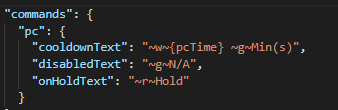
In config.json, you are able to change the string of each different priority status, so you can configure it to look just how you want it.
[Commands]
/lscooldown
/lshold
/lsinproogress
/lsreset
/bccooldown
/bchold
/bcinprogress
/bcreset